1. Install the archive server distribution kit. If you are installing a free version of the software (Medina_Free_x64.exe) or a general setup (MedinaBox_x64.exe), then you do not need to install a separate archive server.
2. Launch the GOALcity program using the shortcut 
3. Go to the Connection Diagram by pressing button  or
or  on the Main Panel.

4. On the Connection Diagram, go to the Archive Server settings and create a new archive.
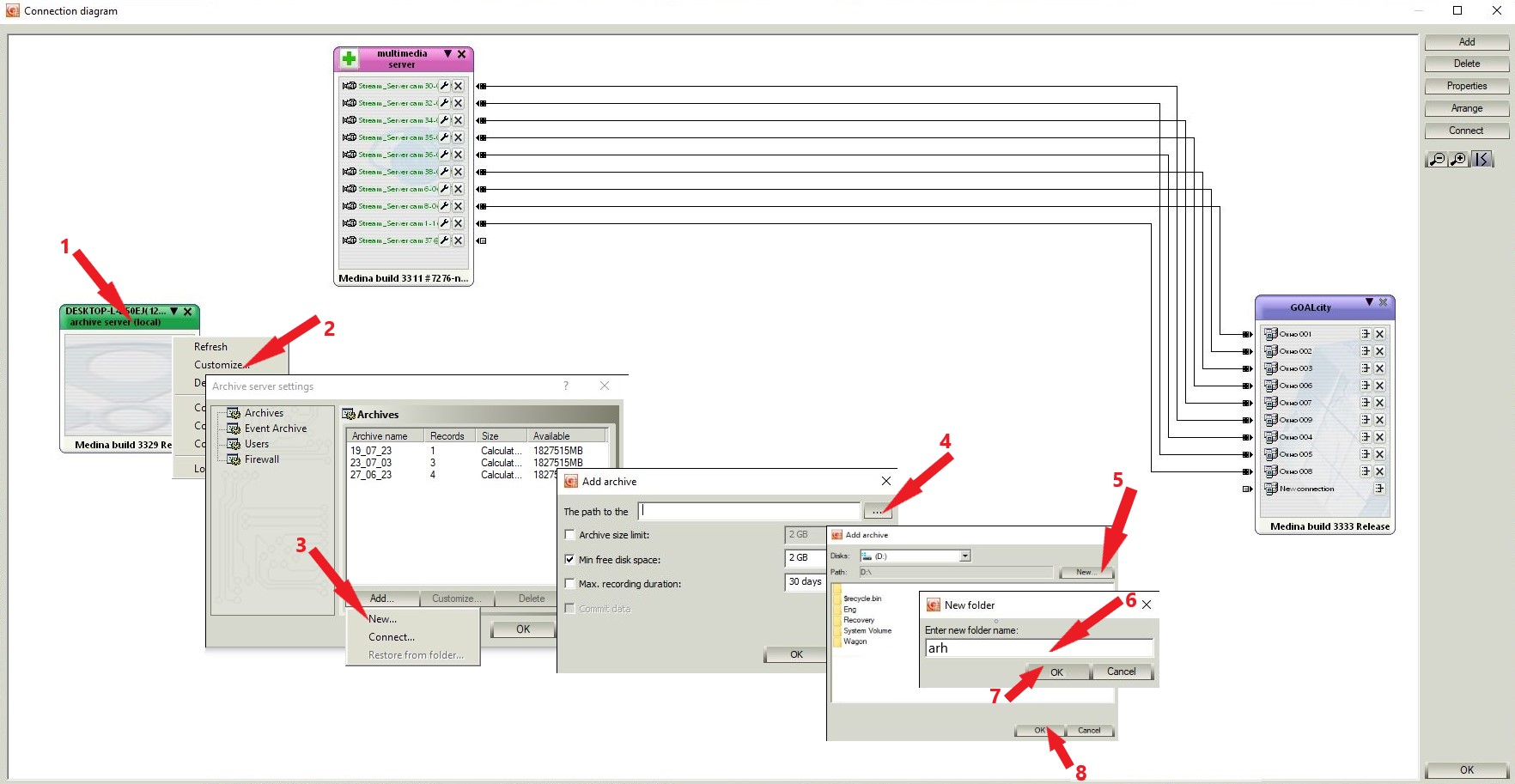
When creating an archive, you can select archive limits.

Archive size limit - the maximum size of the local archive will be equal to the value set in this field. If the archive size reaches the maximum value, then the old records will be deleted.
Minimum free disk space - the amount of free space that will be ignored by the program during recording and always remain free. The minimum value should not be less than 10% of the total hard drive capacity. This volume is necessary for the normal operation of the "self-erasing" mechanism.
Maximum recording duration - after the specified number of days, the recordings will be deleted.
5. Set up archive and recording. How to do this, you can read here.